Monday, June 30, 2014

Earn Money Using Adf.ly

Earn Money Using Adf.ly..

What Is Adf.ly ? :

As you know that there are thousand of jobs available on the internet, half of world doing jobs, business online, now a day internet become very popular in the category of online earning which is good trend, every next man want to know that how to make money online? As I mention above that there are lot of ways to earn, but always pick trusted work, so here I am going to tell you that how you can make little but enough Money Online With adf.ly

Click here to register

Click here to regsiter


Adf.ly is a world largest website which allows you to shrink your URL, it is not different from other such websites like goo.gl, bitly.com, tinyurl.com, but difference is they will give you a fix part of money against visitors and they have ad twist. When somebody opens the shorl URL there will be 5 second frame and ad, after 5 seconds you will be redirected to your original link, they will give you $5 against 10,000 visitors, mean to say that if 10,000 peoples visits your shrink URL then they will give you $5.

How To Make Money Online With adf.ly 

Adf.ly Review:

So how much can you can you make with Adfly?

Lot of my friends ask me this question, well, its depend on you, if you have good traffic on your blog or if you have good community on social media, then you can earn maximum, generally I think you can make 1$ to 2$ daily not more, because if you will redirect 10,000 visitors then you will get $5 which is huge amount of traffic and bit amount of money.

Requirements To Earn From Adf.ly 

You need to have at least one blog or website, about any niche which is popular like Downloads, Software, Movies, Music or E-Books, anything which need to be downloaded from 3rd party websites.

How To Make Account And How To Start Earning?

After introduction of adf.ly, now I am going to show you practically that how you can make account there and how your earning will start, well, first of all visit adf.ly, now click on join now if you don’t have already account, after registration you will get verification email, after verifying your account, you will enter in your account.
Now the real work will start, now copy URL where you want to redirect your visitors means your blog or website link and paste into your account, now click on shrink as you see below in picture.
earn at adfly


How to Get Traffic For your adf.ly Links:

1)Social Media
Social media can help you a lot in this matter, spread this link on Facebook, Twitter, Pinterest, YouTube etc, as you know that millions of peoples actives at a time on social media, so you can get more visitors from such websites.
2)Website or Blog
Website or blog also can help you, if your website or blog in good rank and you have good amount of traffic there, then more visitors will come and more will visit your links, you can make free blog on blogger for this task.
3)Ask To Your Friends 
Give this link to your friends as well, make a huge list of friend and spread your link as much as possible, more friends visit more earning, so make friends on social media like Facebook, Linkedin etc.

How Adf.ly Will Pay?

They will pay you through Paypal and Payoneer account,  they will pay you through paypal when your balance reached $5 and Payoneer $10.

Sunday, June 29, 2014

Top 10 Paid To Click Websites Must To Join

These Are The TOP 10 Paid to Click Websites That really Pays:


These are listed the latest ptc sites that are paying....


1. neobux.com (click the image below to join neobux)


 Click To Join Neobux Now

 Click To Register
  • Online Since 2008 – Oldest and TOP PTC site
  • Almost 10,000 users Register in Neobux Every Day.
  • Minimum (1st) Cashout $2 – Instant Payout.
  • Want to read more about Neobux Click HERE.
  • Daily 50+ Ads to view – Use Noebux Adalert Toolbar.
  • Get Ref-Cash Back Reward from me: 50% Extra from me when you take your 1st Cashout. READ MORE.
  ▬▬▬▬▬▬▬▬▬▬▬▬▬▬▬▬▬▬▬▬▬▬▬▬▬▬▬                                   

   2.probux.com (click the image below to join probux) 


 Click To Join Probux Now
                                                           
 Click To Join Probux

  • Online Since 2012 – Highly Famous like Neobux
  • Almost 8,000 users Daily Register in Probux.
  • Minimum (1st) Cashout $2 – Instant Payout.
  • Daily earning $0.05+ as Standard User
  • 50+ Ads Daily – Use this AdAlert Toolbar.
  • Get Ref-Cash Back Reward from me:50% Extra from me when you take your 1st Cashout. READ MORE
  • After registration drop your username in comments to get Free Guidancefrom me about how to earn from neobux.

  ▬▬▬▬▬▬▬▬▬▬▬▬▬▬▬▬▬▬▬▬▬▬▬▬▬▬▬

3.neatclix.com (click the image join neatclicks)


 Click To Join Neatclicks

 Click To Join Neatclicks!
  • Online Since 2012 – Queen of ptc sites
  • Almost 8,000 users Daily Register in neatclix
  • Minimum (1st) Cashout $2 – Instant Payout.
  • Daily earning $0.07+ as Standard User
  • 50+ Ads Daily 
  • Get Ref-Cash Back Reward from me:50% Extra from me when you take your 1st Cashout. READ MORE
  • After registration drop your username in comments to get Free Guidance from me about how to earn from Probux
▬▬▬▬▬▬▬▬▬▬▬▬▬▬▬▬▬▬▬▬▬▬▬▬▬▬
4.twickerz.com (click the image to join twickerz)

 Click To Join Twickerz!

 Click To Join Twickerz!!
  • Online Since 2012 – Black Diamond
  • Almost 8,000 users Daily Register in Twickerz
  • Minimum (1st) Cashout $1.5 – Instant Payout.
  • Daily earning $0.05+ as Standard User
  • 50+ Ads Daily 
  • Get Ref-Cash Back Reward from me:50% Extra from me when you take your 1st Cashout. READ MORE
  • After registration drop your username in comments to get Free Guidance from me about how to earn from neobux.
▬▬▬▬▬▬▬▬▬▬▬▬▬▬▬▬▬▬▬▬▬▬▬▬▬▬

5.zapbux.com (click the image to join zapbux)


 Click To Join Zapbux


 Click To Join Zapbux!

  • Online Since 2012 – Highly Famous like zapbux
  • Almost 8,000 users Daily Register in zapbux
  • Minimum (1st) Cashout $2 – Instant Payout.
  • Daily earning $0.04+ as Standard User
  • 50+ Ads Daily 
  • Get Ref-Cash Back Reward from me:50% Extra from me when you take your 1st Cashout. READ MORE
  • After registration drop your username in comments to get Free Guidance from me about how to earn from neobux.
  • ▬▬▬▬▬▬▬▬▬▬▬▬▬▬▬▬▬▬▬▬▬▬▬▬▬▬▬▬▬▬▬▬▬▬▬▬▬▬

How To Get Verified Paypal Account In Unsupported Countries

Woho! Finally we were able to get our PayPal verified via Payoneer debit card in Un supported country i.e Pakistan. PayPal is an industry standard for online money transactions. Due to the un availability of the great service in Pakistan, it was such a hindrance for us to accept payments from clients and various advertisers.

It was so hard to reject those tempting offers, just due to the non availability of a reputable online transaction service that could act as a bridge to accept payments.

The only thing that kept me pulling back from verifying PayPal via Payoneer debit card was the legitimacy of the process. I doubted if it worked.

earn-money-payoneer-affilliate-program

And trust me, its smooth as silk.


 Join Payoneer.com Now

What is PayPal?


PayPal lets you accept or transfer payments online world wide. As its an industry standard, most of the advertisers are comfortable with the service and gives it priority over other services.

verify-paypal-payoneer


Is Your Country supported?


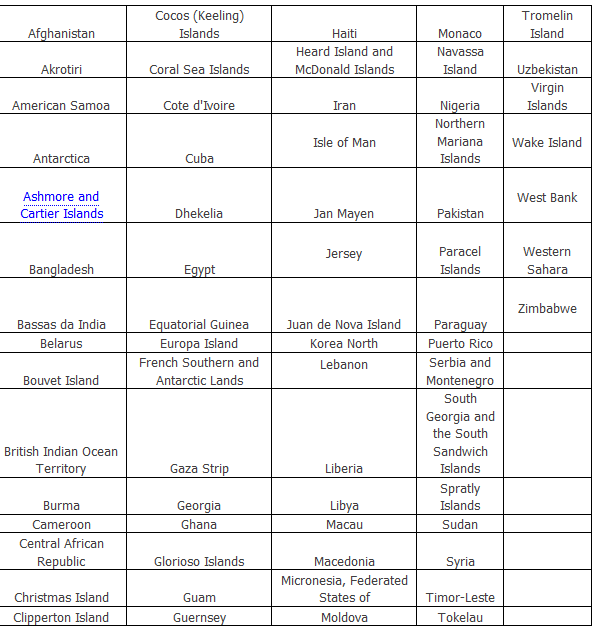
Here is the list where by you can check if your country is supported in PayPal system. 

paypal unsupported countries


Whats the problem with PayPal Verification Process' anyway?


The thing is, PayPal isn't avail able in the entire world. They have a set of countries that are unsupported. Once you try making an account at PayPal.com, you would notice that a bunch of countries aren't listed there.

Thats the deal.

Why to Verify PayPal Account?

 If you go ahead and apply for PayPal account with any other countries name, you would notice that you would be able to make an account. Though this account would be 'unverified'. 

Un-verified PayPal accounts hinder you in few of these ways:

1- Though you can accept payments online (From your sponsors etc by giving away your PayPal ID, i.e your PayPal email address), though you would not be able to widraw your money from your account.

That is you would never be able to see your hard earned money in your hand. Though you can always use your amounts online.

You can buy a domain online with your unverified PayPal account or order a mac book.

2- Unverified Paypal accounts are restricted to 500$ amount of transactions per month. So you cant make payments more than 500$ online in a month. Once the month ends, you can again use 500$ more anywhere online.

So to pull aside 500$ limit and to be able to withdraw your hard earned money in real life, you need to verify the account.

Hope that clears up the entire cloud of confusions. 


What is Payoneer Debit Card?


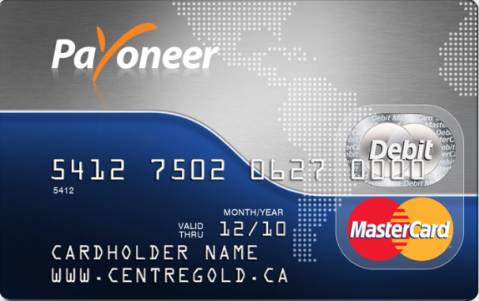
Payoneer is a great service that provides a debit card service (MasterCard) that is accepted world wide and is also one of the most popular debit card services around.

We would use this debit card to verify our PayPal account.


So How to Get Verified PayPal Account?


There are few simple steps that are involved in the process. These are all the steps that i followed and indeed they worked gracfully.

Step 1: Apply for PayPal Account (Will explain in a bit)
Step 2: Apply for Payoneer Debit card
Step 3: Get Payoneer Approval & Recieve debit card
Step 4: Apply for Us Payment Service
Step 5: Enter US Bank Details In PayPal (All is explained later in the post)
Step 6: Make Your First Widrawal
Step 7:Verifiy PayPal
Step 8: Enjoy and Pray for me :)


Step #1 Apply for PayPal Account


Go to PayPal.com and create an account. Enter your name and all the necessary fields. For Address, search for sample address of US. You can easily get that by search Google. There are tons of address that you can enter in the fields below.

Note that we're creating this PayPal account via US (United States). You can use another verified country, though this is how it works perfectly.

create paypal account


Now when asked for Phone number, do the same and search for sample US telephone numbers. Once done, simply hit 'Agree and Create Account' button.

Now you would be taken to the PayPal main menu/dashboard. You would notice that in the status bar it mentions that the account is 'Unverified'.

Once you would complete the entire process, this would turn up to 'verified'.

Step #2 Apply for Payoneer Debit Card


Go to Get Payoneer Debit Card and signup. Fill in all the details. Once done, you would then be asked to verify your Payoneer account. They do that before shipping you the card its self for your verification. 

Payoneer-Prepaid-MasterCard

You would get an email for verification that would lay down the details of how you can verify your account. Most likely they would ask you to upload your ID Card (scanned, or a picture front/back), or a drivers license, passport etc. Any of these would work.

I simply took pictures of the National ID card with my mobile and uploaded the pictures and it worked. (they would tell you the place to upload the document. So there is nothing much to worry)

Step #4 Get Approval


In 3-4 days you would get the email that your Payoneer account has been verified and that they would ship your card to your home (the address that you would give while making the payoneer account).

payoneer approval.jpg


So do give the right information while filling up the Payoneer form. Specially the card holder name. Make sure that it is same as on your National ID card.


 Step #5 Apply for US Payment Service


Us payment Service is a service by Payoneer where by they allow their card holders to get a portion of their US Bank Account.

Basically, to get the PayPal account and get it verified, you require a US bank account. As you dont have that obviously, you would get that via Payoneer US Payment Service.


us payment service


It is actually like a virtual account. Though you don't have the account in reality, Payoneer allocates you (Payoneer Card Holder) a portion of their bank account in US. ( Payoneer have an account in 'First Century Bank' in US.)

So once, you're approved as a card holder in Step#4, you would get an email to apply for US Payment Service if you're interested in receiving money from Companies like PayPal, Amazon etc.

You would simply have to fill in a question are that would require you to answer some simple questions.

Once done, you would submit that form and wait for another 3-4 days. You would than again get an email that your US Payment Service is approved. Your US Bank account details would be emailed to you. ( virtual bank account details).

These details include 'Bank Account#, and 'Securty code'. So by now,  you would have your own virtual bank account (via Payoneer US Payment Service) that you would enter into PayPal bank account verification system to get verified.

So your Payoneer card would represent your First Century Bank account. Every transaction that would be made in your virtual account would be seen in your Payoneer account.

Step #6 Make Your First Widrawl.


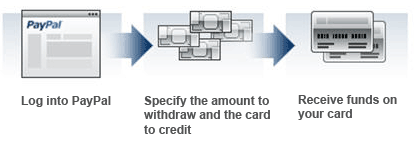
Sign into your PayPal account and withdraw around 4-5$ into your bank account. (your virtual First Century bank account). PayPal would ask you to enter your bank account details. This is where you would enter the details sent by Payoneer in the email.

PayPal would then validate your bank account (takes 2-3 seconds) and would transfer the amounts. You would then able to see these '2 transaction' into your Payoneer transaction list with in 1-2 days. these both transaction would be less than a $. (e.g 0.03 and 0.15).

paypal-withdraw-procees


These would just be made to test if you have the control over your bank account. You would then have to login to your PayPal account again and hit 'verify bank account' link on the right side bar.

Then simply enter these 2 amounts that you checked in your Payoneer transaction list. Thats all. It would verify your bank account and thats all! Wolaa!

You now have your very own PayPal verified account.

Step #7 Withdraw all the money that you want


Now simply transfer your PayPal amounts into your bank account (that is your Payoneer card) and use it anywhere in the world MasterCard supported ATMs.

master card atms

In Pakistan, Standard Chartered bank And Muslim Commercial Bank (MCB) accepts MasterCard.


NOTE: Never enter your Payoneer Card into ATM if it has no amount loaded in it. ATMs would most probably eat up your card. Make sure you load it before using it for withdrawal at ATMs.

Best Paid To Click Website

Infolinks text ads

Must Join

Must Join

Powered by Blogger.

Followers

Galaxyspots.com | Cheap online advertising - No minimum cashout.!!

Must Join


© 2013 All About Your Life. All rights resevered. Designed by Templateism

Back To Top